Monitoring Country

Camera Traps
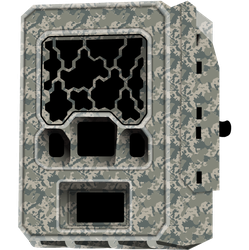
Camera traps automatically take photos or videos when an animal moves in front of the camera and saves the images to a memory card. Camera traps are widely used in wildlife conservation to monitor medium- to large-sized animals like kangaroos, quolls, cats and goannas.
Most camera traps use passive infrared (PIR) sensors that trigger the camera when an animal passes through the "detection zone." PIR sensors work not by detecting movement, but by detecting changes in temperature. Since an animal’s body temperature is usually different from the environment’s temperature, moving through the detection zone creates a temperature change that triggers the camera.
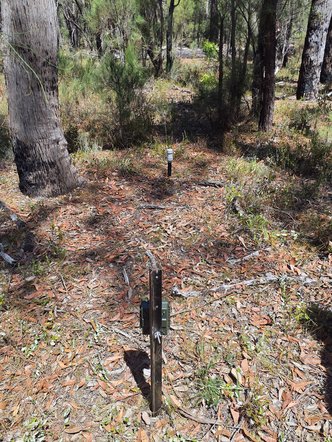
Camera trap facing a bait cannister. Credit: Carly Moir.
Less stress for animals: Camera trap monitoring collects data without catching and handling animals. Animals are often stressed if they are caught and handled by people.
Do the time for you: Camera traps can capture data for long periods of time, requiring less time on Country. Monitoring over longer periods of time can increase the likelihood of picking up rare or infrequently seen species. But they need lots of time in the office to manage and analyse data.
Monitor many: This method can record many of the species on Country, not just one.
Easy to compare: If the monitoring is repeated in different habitat types on Country and across different years, the results can be compared between different places and different times.
What can camera traps monitor?
Camera traps are best for monitoring medium to large sized mammals, like:
- Native mammals – kangaroos, echidnas, wallabies, quolls, dingoes, possums, bilby
- Introduced mammals – cats, foxes, pigs, goats, rabbits, camels
- Reptiles – goannas
Sometimes cameras can be used to monitor smaller animals, like hopping mice, dunnarts, birds and lizards, but it can be harder to identify them because of the quality of infrared images.
When species have distinctive patterns (like the spots on quolls or stripes on numbats) you might be able to identify individual animals.
What can you learn?
Camera traps can be used to answer things like:
- What species live on Country (presence; species inventory)
- What species weren’t detected on Country (absence)
- How many species are on Country (species richness)
- Where are species on Country (species distribution; habitat use)
- How are species acting on Country (species behaviours)
There are many ways to use camera trap data, but it is important to decide how you want to analyse or use the data before you design a monitoring program, for example, do you want to:
- Understand population trends
- How often you detect an animal is usually linked to whether their numbers are going up or dow
- Calculate Relative Abundance Index (RAI)
- Count the number of times each species appears in the images as an estimate of their relative abundance across the landscape (not a precise population count)
- Calculate Biodiversity Index
- Count the total number of different species detected at each camera trap location to get a measure of biodiversity in different parts of the landscape
- Calculate Occupancy Rate
- Calculate the percentage of camera traps where each species was detected. This provides insight into how widespread each species is across the landscape
- Calculate Detection Rate Over Time
- Track detection rates of species over time (e.g., weekly, monthly or even longer) to identify any patterns that may be linked to environmental changes like seasons or weather. Tracking detection rates over longer times can also show how species respond to management actions, such as fire or introduced predator control, by revealing any changes in animal activity or abundance following these management actions
- Calculate Population size (if individually identifiable)
- If you are monitoring a species that is individually identifiable from markings or patterns, like quolls or numbats, you can use mark-recapture analyses to estimate population size
If you monitor at the same place at the same time every year, you can see if there are changes to species living on Country. You can look at changes over time and decide if your management actions are working well.
What can’t you learn?
- Population size (of most species)
- the number of animals seen doesn’t always tell you how many animals are actually living there (unless individuals are individually identifiable)
- Which species truly aren’t living on Country
- not detecting a species doesn’t always mean it isn’t there. Some species might not be active when you do your survey, they might live in a different habitat type, are cryptic, or the camera might not be good at detecting them
- Camera traps are not good at monitoring some species, for example: reptile body temperature doesn’t differ from the ambient temperature so isn’t good at triggering the camera; small, mouse-size species can be difficult to distinguish.
Using Camera Traps the Right-way
How long to leave out cameras: You may need to leave cameras out longer if you have hard to detect species, or if you want to detect all species in an area. Some species may change their behaviour or move to different places throughout the year.
Imperfect Detection: Camera traps may sometimes miss animals, especially reptiles, because their surface temperature is often similar to the background temperature. Detection also varies by species size, distance to the camera, direction of movement, environmental conditions, different camera models, and internal camera settings.
Choosing Camera Height for Best Detection:
- Cameras set high looking down have smaller overall detection zones making it less likely to detect small animals or missing those outside the detection zone (Figure 1)
- Lower cameras (30–40 cm above ground – see Figure 2) that face forwards can capture both small and large species
- Cameras should generally be positioned at a height relative to the smallest target species' body mass for the best results (see Figure 3)

Figure 1: Low cameras detect both small and large animals, while higher ones can miss small or even medium sized species if they are close to the camera.
 Figure 2: Height of camera to give good detection of a wide range of animal sizes.

Figure 3: High-mounted cameras facing down (b) have smaller detection zones than those mount low facing outwards (a).
False Triggers: The camera can be set off by moving vegetation (blowing in the wind) or if the camera moves (wobbly post or tree). Sunlight can also set it off. Tips to set up cameras to avoid false triggers:
- Mount on stable objects like stakes or tree trunks and use solid mounts like bolts (Figure 4)
- Avoid obstructions like vegetation or large rocks in the detection zone (Figure 5)
- Face cameras south to reduce false triggers from direct sunlight
- The camera setting (PIR sensitivity) can be changed to reduce false triggers, but this may mean that sometimes the camera doesn’t take photos when animals are actually present.

Figure 4: Simple camera mount using a bolt through a peg to the back of the camera can minimise false triggers caused by movement.

Figure 5: Clear camera (a) views improve detection rates over placement with obstructions (b) and helps reduce false triggers from vegetation movement.
Best practice for managing cameras and images
- Label each camera and assign matching “a” and “b” SD cards e.g. camera labelled: CAM01, SD cards labelled: CAM01a and CAM01b
- Record good data when putting out, servicing and collecting cameras, including the camera label, SD card label, site name, and GPS coordinates
- Check settings are the same on all cameras
- Make sure the time and date are correct
- Set PIR to high
- Capture three images with no delay between triggers
- Balance shutter speed and ISO to reduce blur.
Software to manage images and data
There are many software options available that can help to store, organise and manage camera trapping images and data. Some can even help with analyses and reporting. Free, downloadable options include: Camelot, Timelapse and CPW Photo Warehouse.
Processing thousands of camera trap images manually can take a long time. You can now use computer-aided tools to quickly process images. These can include:
- Object Detectors: automatically find and draw boxes around animals, people, or other objects of interest in your photos. This also allows you to skip false trigger images with nothing in them
- Image Classifiers: These tools classify the objects found in photos into categories such as species (e.g., "Dingo" or "Cat"), or simpler categories like “animal”, “human”, or “vehicle”
You can use pre-trained models or create custom models specifically for your local wildlife. By using these methods, you can reduce manual review time, letting you focus on the results rather than the sorting.
Resources include online tools like WildObs and Wildlife Insights, or downloadable tools you can use on your computer such as MegaDetector, AddaxAI and SpeciesNet.
REMEMBER! Be sure to understand how any data you upload might be used, or become available to others, when using online tools.
REMEMBER! It is important to still proof (check) the results of any automated processing. It can make mistakes. Looking at photos is also a great way to keep an eye on animal behaviour and health.
Landscape scale camera trap monitoring
Animals can be monitored with camera traps to find out what species are living on Country (inventory) and where they are living (occupancy).
You can learn how to use camera traps for monitoring fauna using the Environmental Monitoring Method for Landscape Scale Camera Trap Monitoring.
Arboreal fauna camera trap monitoring
Tree-climbing species can be monitored with camera traps to find out what species are living on Country (inventory) and where they are living (occupancy). A good way to do this is by mounting cameras on platforms facing tree trunks (Figure 6).

Figure 6: Platform setup with a lure container for tree-climbing species.
You can learn how to use camera traps for monitoring arboreal fauna using the Environmental Monitoring Method for Arboreal fauna camera trap monitoring (in development).
Any time you do work that might disturb or interfere with native animals and vegetation, particularly threatened species, you need to check with the state authorities to see if you need any approvals, such as scientific licences or animal ethics committee permits.

Primary sources
This landing page was developed using the following sources:
- Gillespie, G. R., Brennan, K., Gentles, T., Hill, B., Low Choy, J., Mahney, T., Stevens, A., and Stokeld, D. (2015). A guide for the use of remote cameras for wildlife survey in northern Australia. Darwin: Charles Darwin University. https://territorystories.nt.gov.au/10070/435881/0/20
- Meek, PD., Ballard, G., and Fleming, P. (2012). An Introduction to Camera Trapping for Wildlife Surveys in Australia. PestSmart Toolkit publication, Invasive Animals Cooperative Research Centre, Canberra, Australia. https://pestsmart.org.au/wp-content/uploads/sites/3/2020/06/CameraTrapManual_2012.pdf
Tools and resources
- EMSA standardised survey methods: Camera Trapping Module
- Healthy Country AI have resources on setting up camera trap image management software:
Webpage version: MC-CM-JH-GA-140426